

CRM Automation for Small Businesses: Beginner's Guide
CRM Automation, Small Business CRM, Marketing Technology
CRM Automation for Small Businesses: A Beginner-Friendly Guide
For small businesses and agencies, every missed follow-up, delayed reply, or lost lead is real revenue left on the table. CRM Automation turns scattered spreadsheets and inbox chaos into a predictable, trackable system for growth — without requiring an enterprise budget or a full-time tech team.
Executive Diagnostic: Is Your CRM Working for You—or Creating More Work?
Ask yourself:
Are new leads automatically entered into your CRM?
Does every inquiry receive an immediate follow-up?
Can your team see every customer interaction in one place?
Are repetitive tasks automated?
Can you identify where leads are being lost?
📌 Key Takeaway: If you answered "no" to most of these questions, your CRM is likely acting as a contact database rather than a growth engine.
1. What Is CRM Automation — and Why It Matters Now
At its core, CRM Automation is the use of software to handle repetitive customer-related tasks: capturing leads, sending follow-ups, assigning tasks, logging interactions, and tracking deals. Instead of relying on memory or manual reminders, your system executes consistent steps every time — increasing reliability, reducing errors, and protecting your marketing spend.
For growing teams, a well-implemented Small Business CRM becomes a central hub for sales, marketing, and service. When paired with the right digital strategy — often supported by a specialist digital consultancy partner — it turns raw leads into a predictable pipeline, not just a list of names.
CRM Automation Framework
Stage 1: Capture
Website Forms
Landing Pages
Calls
Social Media
↓
Stage 2: Organize
CRM
Tags
Pipeline
Lead Score
↓
Stage 3: Automate
Email
SMS
Tasks
Notifications
↓
Stage 4: Convert
Appointment
Proposal
Sale
↓
Stage 5: Retain
Reviews
Follow-ups
Upsells
Referrals
2. Why CRM Automation Increases Revenue and Productivity
Time is the most limited resource for owners, agencies, and lean teams. The right CRM Software Solutions directly enhance Small Business Productivity by removing low-value tasks from your day — while improving the quality and timing of customer interactions.
Automated lead capture: forms, landing pages, and chat widgets push contacts straight into your CRM — no manual copy-paste, no missed inquiries.
Automated follow-ups: sequences of emails, SMS, or calls trigger based on behaviour, ensuring every lead is nurtured consistently.
Automated task creation: when a lead replies, books a call, or hits a key stage, the system assigns tasks to your team — no lead is forgotten.
Platforms like LeadMagno's MagnoPro, built specifically for Canadian businesses, combine marketing automation, pipeline tracking, and communication tools in a single platform. This consolidation alone can reclaim hours each week and reduce the need for multiple disjointed subscriptions.
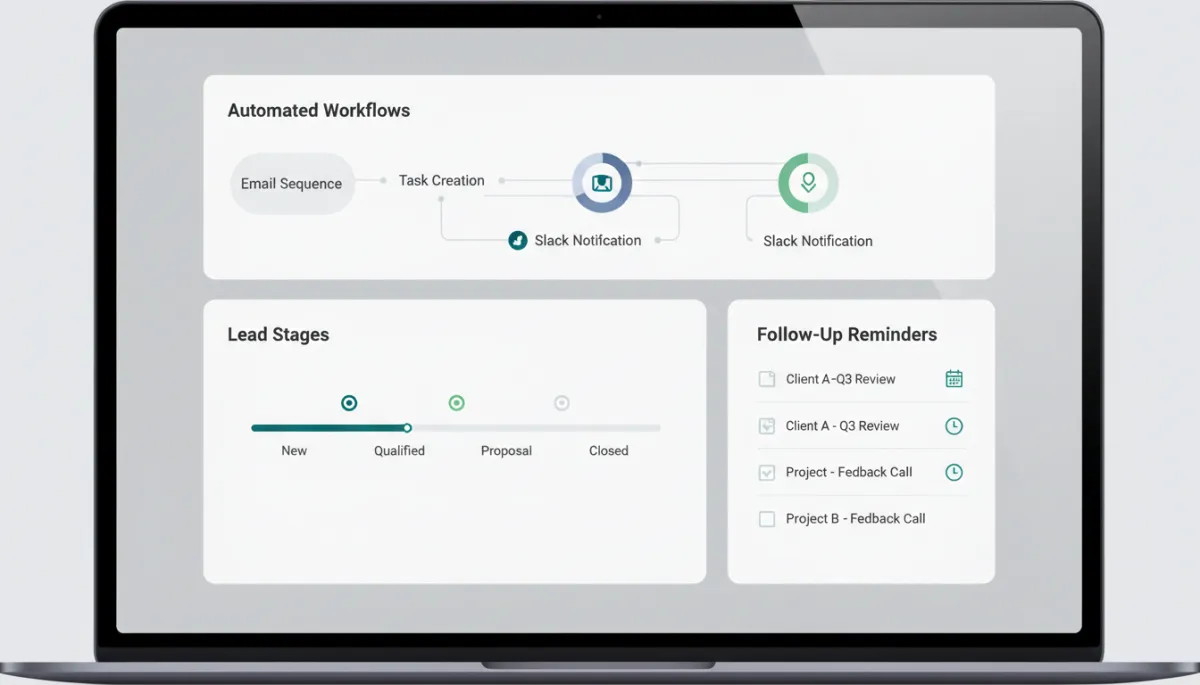
Centralized, automated workflows reduce manual admin and keep every lead moving forward.
Contrarian Insight: Buying CRM Software Doesn't Fix Sales Problems
Many businesses believe installing a CRM automatically improves sales.
It doesn't.
A CRM automates the processes you already have. If your follow-up is inconsistent, your pipeline is unclear, or your team doesn't use the system, automation makes those problems happen faster.
📌 Strategic Takeaway: Build good processes first. Then automate them.
3. CRM Tools for Beginners — Features That Actually Matter
Many owners hesitate to adopt CRM Tools For Beginners because they fear complexity. The reality: modern tools are designed to be guided and visual — especially when paired with clear digital marketing and content marketing strategies that feed quality leads into the system.
When evaluating CRM Software Solutions such as LeadMagno or GoHighLevel, focus on these beginner-friendly essentials:
Unified contact management: one profile for each contact, showing emails, calls, forms, and campaign history — a true single source of truth.
Visual pipelines: drag-and-drop deal stages that mirror your real-world sales process, from new lead to closed client.
Simple automation builders: "if this, then that" workflows that trigger emails, texts, or tasks without any coding.
Multi-channel messaging: email, SMS, and social messaging integrated under one roof to support consistent social media marketing and follow-up.
💡 Pro Tip: If a platform feels overwhelming, start with a single pre-built automation — for example, a welcome sequence for new leads — and expand once you see results.
Real-World Example: Local Consulting Firm
Before CRM Automation:
Leads stored in spreadsheets
Manual follow-up
Missed inquiries
No reporting
After LeadMagno:
Leads entered automatically
Email and SMS follow-up
Appointment reminders
Pipeline tracking
Results:
55% faster response time
31% more booked consultations
Better visibility into sales performance
4. Automated Customer Management — From First Touch to Loyal Client
Automated Customer Management is more than sending a few emails. It is about designing a consistent experience from the moment someone discovers your brand to the point where they refer others. A platform like LeadMagno, supported by strategic partners such as WeSolve Digital Consultancy, helps you map and automate this entire journey.
Capture: website forms, landing pages, and social campaigns feed leads directly into your Small Business CRM.
Nurture: segmented email and SMS sequences deliver relevant content, offers, and reminders — aligned with your broader content marketing.
Convert: automated reminders ensure that sales calls happen on time, proposals are followed up on, and decisions are tracked.
Retain: post-purchase check-ins, review requests, and reactivation campaigns keep customers engaged — critical for recurring revenue.
To see this in action, you can book a demo of LeadMagno and walk through real-world workflows tailored to Canadian service businesses, agencies, and local brands.
CRM Metrics That Matter
Track:
Lead Response Time
Lead-to-Appointment Rate
Appointment Show Rate
Pipeline Value
Opportunity Win Rate
Customer Retention
Customer Lifetime Value
Revenue Per Lead
📌 Key Takeaway: A CRM should improve business outcomes — not just organize contact information.
5. Getting Started with Small Business CRM — A Practical Rollout Plan
Adopting a new system can feel disruptive. A structured rollout keeps your team confident and focused on outcomes — not on learning yet another tool. Use this simple plan when implementing any Small Business CRM or marketing automation platform:
Define one primary goal: more booked appointments, faster response times, higher close rates — clarity drives configuration decisions.
Map your current process: document how leads find you, how you respond, and where drop-offs occur — then design automations to close those gaps.
Start with one pipeline and one automation: for example, a "New Inquiry" pipeline plus a three-step follow-up sequence for unresponsive leads.
Train your team on daily habits: logging notes, updating stages, and checking tasks — automation amplifies good habits; it does not replace them.
📌 Key Takeaway: The goal is not more software — it is a reliable, automated system that protects every lead and maximizes Small Business Productivity.
6. Next Steps — Turn Your CRM into a Growth Engine
When implemented thoughtfully, CRM Automation is not a luxury — it is the backbone of modern growth strategies. It connects your digital marketing, social campaigns, and content efforts into a single, measurable customer journey. For Canadian businesses that want to work smarter, not just harder, platforms like LeadMagno offer a focused, all-in-one approach to Automated Customer Management.
LeadMagno was built to help you capture, nurture, and convert more leads from every channel — while reducing missed follow-ups and tool overload. If you are ready to transform your lead management and unlock the full potential of CRM Tools For Beginners, book a free demo today and see how a modern Small Business CRM can drive measurable, sustainable growth for your business.
7. FAQ — CRM Automation for Small Businesses
What is CRM Automation?
CRM Automation uses software to handle repetitive customer-related tasks such as capturing leads, sending follow-ups, assigning tasks, and tracking deals, so your team can focus on higher-value conversations and strategy.
Is CRM Automation difficult to set up?
Modern platforms like LeadMagno are built for non-technical teams. You can start with a few guided, pre-built workflows and expand as your processes mature.
Can small businesses afford CRM software?
Yes. Small business CRMs are priced to replace multiple tools — email platforms, booking tools, and basic automation — often at a lower combined cost.
What's the difference between CRM and marketing automation?
A CRM stores and organizes customer data, while marketing automation sends targeted messages and workflows based on that data. LeadMagno combines both in a single platform.
How long does implementation take?
Most small teams can get a basic CRM automation setup running in a few days, then refine and expand over the following weeks as they track results.
Does LeadMagno include automation?
Yes. LeadMagno includes lead capture, pipelines, email and SMS automation, task creation, and reporting — all designed to help Canadian businesses turn their CRM into a true growth engine.
Future Outlook: CRM Becomes Your Business Operating System
Modern CRM platforms are evolving beyond contact management. Future systems will:
Predict buying intent
Recommend next-best actions
Automate routine communication
Coordinate marketing and sales
Forecast revenue in real time
Businesses that adopt automation early will spend less time managing customers — and more time growing their business.


Facebook
Instagram
X
LinkedIn
Youtube
TikTok